Privacy & sharing
Couples & household visibility
What the other member of your household is shown of your accounts, transactions, plan lines, savings funds, points and equity, and the settings that decide it.
In a Taiga Finance household, two people share one account, and each account you own carries a Sharing setting that decides what the other member is shown of it: Separate, Balance only, or Joint. A transaction on a joint account can be marked private on its own, a savings fund, points program or equity grant has its own owner or visibility field, and the plan is one household plan whose private parts the other member sees as a single rollup. A sharing setting is an in-app setting, not a legal wall: totals still reconcile, a hidden-rows note appears where something is held back, and the admin can remove a member.
What is household visibility?
Section titled “What is household visibility?”A household in Taiga Finance is two people, an Admin and a Member. Visibility is set per account rather than all-or-nothing: a joint checking account fully shared, a retirement account shown as a balance only, and a separate account kept to yourself, all at once. What the other member is shown is computed on every page load from those settings, so a change takes effect on their next screen. The household terms both of you agreed to when the household formed say the same thing, and end with the one guarantee that is not a setting: For anything the other person must never see, keep it in a separate household.
What can my household member see?
Section titled “What can my household member see?”Detail means the individual transactions and holdings. Balance means the account’s current value.
| Your account or row | What the other member is shown |
|---|---|
| A Joint account | Everything: the balance, the transactions, the holdings. |
| A transaction you mark private on a joint account | Nothing in its place. The row is left out of their view. |
| An account shared as Balance only | The account and its balance, not its transactions or holdings. |
| A Separate account | No name, balance or transactions. Its value rolls up into one hidden line so totals reconcile, and reports note that some of your rows are hidden from them. |
Where do I choose what to share?
Section titled “Where do I choose what to share?”Each account’s Sharing setting lives in that account’s own panel, opened from Accounts, next to an Owner row. Both rows appear only in a household with two members.
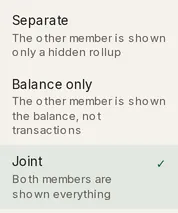
- Separate — The other member is shown only a hidden rollup.
- Balance only — The other member is shown the balance, not transactions.
- Joint — Both members are shown everything.
An account you have not set is Separate. Only the account’s owner can change the Owner or share it less widely; the other member sees both rows read-only with the note Only the owner can change the owner or share this less widely. The same owner-only rule covers archiving, restoring, deleting or merging the account.
To hold back a single transaction without changing the whole account, open it on a joint account and click Make private. Make visible puts it back. On a Separate account the button changes nothing, because the other member is not shown the row anyway.
What does the other member see of my plan, funds, points and equity?
Section titled “What does the other member see of my plan, funds, points and equity?”Since the plan became one household plan, a budget spending line belongs to the household, and both of you see it. A spending line’s privacy comes from the savings fund behind it: a fund has a Fund owner, either Shared (household) or you, and Personal funds are yours; the other member is shown one rollup. The other member sees your personal lines in each plan section as a single row, [Your name]’s personal, with its amounts but no line names. Your income rolls up the same way, as [Your name]’s income. On a shared spending line, spend from your separate accounts counts toward the line for both of you, and the other member’s drill-in shows it as Private activity (N txns) with the amount, not the rows.
A points program has a Visibility row in its drawer: you, the other member, Joint (Owned together) or Private (Yours only). An equity grant or holding has a Visibility field, solo or household, that only its owner can narrow.
Troubleshooting
Section titled “Troubleshooting”The other member can still see an account I changed.
Section titled “The other member can still see an account I changed.”Visibility is recomputed when a page loads, not pushed to the other person live. The change takes effect the next time they open or reload the page.
There’s no Sharing row on my account.
Section titled “There’s no Sharing row on my account.”The Owner and Sharing rows appear only in a household with two members. On a solo account there is nothing to share, so the rows are hidden. They appear once another member joins.
The Sharing row is read-only, with “Only the owner can change the owner or share this less widely.”
Section titled “The Sharing row is read-only, with “Only the owner can change the owner or share this less widely.””You are not this account’s owner. A joint account is already shown to both of you, and only its owner can narrow that. Ask the owner to change it from their sign-in.
A report says some of my partner’s rows are hidden from me.
Section titled “A report says some of my partner’s rows are hidden from me.”The note Some of [name]’s rows are hidden from you — these totals understate. (or, with a member breakdown, Totals for [name] exclude rows hidden from you.) means the period includes transactions on their Separate accounts or rows they marked private. The report counts what you are shown and says so.
Can the other member change what I share?
Section titled “Can the other member change what I share?”No. Only the account’s owner can change its Owner or share it less widely. The other member sees the two rows read-only. A joint co-owner can edit the account’s details but not its sharing.
Is my private data in the other member’s export?
Section titled “Is my private data in the other member’s export?”No. An export is built from what that person is shown, not the household total. Their download leaves out your private transactions and your Separate accounts, and shows a Balance only account as a balance and nothing more. CSV exports covers this per file.
Can I share just one account and keep the rest separate?
Section titled “Can I share just one account and keep the rest separate?”Yes. Visibility is per account. One account can be Joint, another Balance only, and the rest Separate. Each account’s Sharing setting is independent of the others.
What happens to a shared account if I leave the household?
Section titled “What happens to a shared account if I leave the household?”It stays with the household. A member leaves by deleting their sign-in, and joint accounts transfer to the member who stays, while Separate and Balance only accounts are deleted with the sign-in. Leaving or removing a member walks through each exit.
Does the other member know I’ve hidden something?
Section titled “Does the other member know I’ve hidden something?”Sometimes. A transaction you mark private on a joint account leaves no row behind. A Separate account is never listed for them, but its value is in a hidden rollup so totals reconcile, and once it has transactions in the period shown, reports mark your name as having rows hidden from them, never the account, its name, or the rows.