Accounts & connections
Connect a bank
Link a bank through Plaid so balances and transactions update on their own.
A connected bank is the way balances and transactions reach Taiga Finance without you typing them, so it is usually the first thing to set up. On the Accounts page, click + Add account, then Connect via Plaid. The first time, Taiga Finance shows a one-page consent headed Connect your bank and waits for Agree and connect. Plaid Link then opens in its own window. Find your bank, sign in, and choose which accounts to share. Taiga Finance confirms with “… connected — history arrives over the next few minutes”, and the accounts appear on the page as the first sync runs.
What is a synced connection?
Section titled “What is a synced connection?”A synced connection is a read-only link to your bank. Taiga Finance reads balances and transactions through Plaid, a bank-data service your bank already works with, so a new account updates itself instead of waiting for a monthly file. It never moves money, and your login stays with your bank. One connection covers every account you share from that bank, and you can disconnect it any time in Settings.
How do I connect a bank?
Section titled “How do I connect a bank?”-
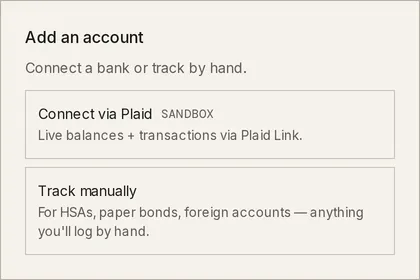
On Accounts, click + Add account. The Add an account chooser opens with Connect via Plaid above Track manually.
-
Click Connect via Plaid. The first time you connect a bank, the Connect your bank consent opens over Taiga Finance. It says what Taiga Finance receives from the bank, who else receives it, and how to stop. Read it and click Agree and connect. Cancel closes it and connects nothing.
-
Plaid Link opens in its own window over Taiga Finance. Search for your bank and select it, then sign in with the bank’s own login, inside Plaid’s window.
-
Choose the accounts to share and confirm. The window closes and returns you to Taiga Finance.
-
Taiga Finance confirms with “… connected — history arrives over the next few minutes”. The linked accounts appear on the Accounts page while the first sync runs.
What does the bank consent say?
Section titled “What does the bank consent say?”The Connect your bank page is Taiga Finance’s own consent, shown before Plaid’s. Plaid then shows its own screens and asks for its own. It carries a Version date at the foot and a link to the privacy policy. Its sections are What we receive (account names, types and balances, the last four digits of each account number, and your transactions; never your bank password or full account and routing numbers), How we use and keep it, Who else receives it, Your household (the members who can also see these accounts, omitted when you are the only member), and How to stop.
You agree once. The consent comes back only when its text changes, and only before a new connection. Repairing a connection never asks again. Withdrawing it is Disconnect on the bank’s row in Settings, described under Can I disconnect a bank?.
What does the first sync bring in?
Section titled “What does the first sync bring in?”Each freshly connected bank shows a card above the ledger on Accounts until its accounts land. The card reads Syncing… while the first sync runs. Balances arrive first. Transaction history follows over the next few minutes while Plaid runs its historical pull, which asks the bank for up to two years. A card that ends on No accounts found or Couldn’t sync gains a Manage button that opens Settings, where the bank’s row says what happened.
How do I add an account the bank didn’t share?
Section titled “How do I add an account the bank didn’t share?”A connection holds the accounts you chose in Plaid’s window. To change the set later, open Settings, expand the bank’s row under Connections, and click Add or change accounts. Plaid’s account picker opens for that bank. Pick the accounts and confirm. Taiga Finance confirms with a count, “… added”, and the new accounts arrive over the next few minutes.
When the bank itself gains an account Taiga Finance has not seen, the bank’s row reads new accounts available at the bank and offers Add accounts without expanding. The drawer of each account on that connection shows the same cue: New accounts are available at Plaid, with Add or change accounts. Closing the picker without choosing dismisses the cue.
How else can I connect a bank?
Section titled “How else can I connect a bank?”Plaid is the one live connection. An account no connection reaches, such as an HSA, a paper bond, or a foreign account, is tracked with Track manually in the same chooser, where you record each balance yourself. See Manual accounts. A bank’s CSV or PDF statement loads its transactions through the Import page, with or without a connection. See CSV & PDF importers.
Troubleshooting
Section titled “Troubleshooting”The chooser reads “You’ve reached the bank-connection limit for this sign-in.”
Section titled “The chooser reads “You’ve reached the bank-connection limit for this sign-in.””Your sign-in is at its cap on live bank connections, and the Connect via Plaid option is replaced by that line. The same line sits in Settings in place of Connect a bank. Disconnect a bank you no longer need before adding another.
“Could not open Plaid. Please try again.”
Section titled ““Could not open Plaid. Please try again.””Taiga Finance could not start a Plaid Link session, usually a passing error. Click Connect via Plaid again in a moment.
The chooser says the bank is already connected
Section titled “The chooser says the bank is already connected”You chose a bank that is already connected under your sign-in. A healthy connection answers with a toast and connects nothing. A connection that needs attention opens a dialog headed with the bank’s name, reading That connection needs attention., with Fix connection in place of a second link. When the existing connection already holds part of what you chose, the dialog says so and offers Add accounts instead. Connect anyway creates a second connection regardless.
“Account connected but could not save — please try again.”
Section titled ““Account connected but could not save — please try again.””Plaid’s window finished, but Taiga Finance could not record the connection. Nothing is saved. Click Connect via Plaid again.
Plaid’s window closed and nothing connected
Section titled “Plaid’s window closed and nothing connected”You left Plaid Link before finishing, and Taiga Finance reads The bank connection did not finish. Nothing is saved. Click Connect via Plaid again to start over.
The chooser reads “Not available in the demo.”
Section titled “The chooser reads “Not available in the demo.””Connecting a bank writes to the household, which the demo does not allow. Sign up to connect your own bank.
Can I disconnect a bank?
Section titled “Can I disconnect a bank?”Yes. In Settings, expand the bank’s row and click Disconnect. The dialog, Disconnect the bank’s name, says syncing stops now and that Taiga Finance asks Plaid to end its access. Under The accounts it brought in you choose Keep the accounts and history (they stop updating; the default) or Delete the accounts and their history, which asks you to type DELETE ACCOUNTS and cannot be undone. Disable on the same row pauses syncing without ending the connection.
Does Taiga Finance see my bank password?
Section titled “Does Taiga Finance see my bank password?”No. The login happens inside Plaid’s own window, and the credentials stay with your bank. Taiga Finance receives account names, types and balances, the last four digits of each account number, and transactions, as the consent lists. The connection is read-only, so it never moves money.
Does the account keep syncing on its own?
Section titled “Does the account keep syncing on its own?”Yes. Once linked, Taiga Finance polls the bank on its own and updates balances and new transactions. You can also start a run yourself with ⟳ Sync now in Settings, where each bank’s row shows when it was last polled.
Does connecting bring in past transactions?
Section titled “Does connecting bring in past transactions?”Yes. Plaid is asked for up to two years of history when you connect, as far back as the bank provides. Balances land first, then the history fills in over the next few minutes, which is why a new bank can briefly show a balance with no transactions.
What happens if the connection breaks?
Section titled “What happens if the connection breaks?”Taiga Finance says so before it breaks when it can. A bank about to end access reads Expiring in Settings and access expires with the date, and each account’s drawer shows Plaid access expires … with Fix connection. A connection that has broken reads Needs attention, with the same button. Connection statuses lists every state, and Troubleshooting sync has the repair steps.