Accounts & connections
Manual accounts
How to track an account Taiga Finance can't sync, and keep its balance current by hand.
On Accounts, click + Add account, choose Track manually, pick a type, name it, and click Create account. A manual account has no bank connection, so its balance never changes on its own. You keep it current with Set balance, which records a balance for a given date. It counts toward net worth and reports like any other account.
What is a manual account?
Section titled “What is a manual account?”An account you add and update by hand, with no live bank link. It holds a balance Taiga Finance can’t reach on its own: an HSA, a cash envelope, paper bonds, a foreign account, a cold wallet. Where a synced account shows its institution, a manual one shows Manual account, and its balance changes only when you record a new one. Everything else — categories, net worth, reports — treats it the same as a connected account.
How do I add a manual account?
Section titled “How do I add a manual account?”-
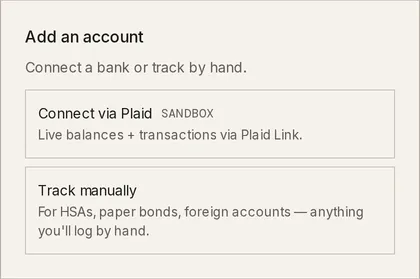
On Accounts, click + Add account. The Add an account chooser opens.
-
Click Track manually. The Add a manual account form opens.
-
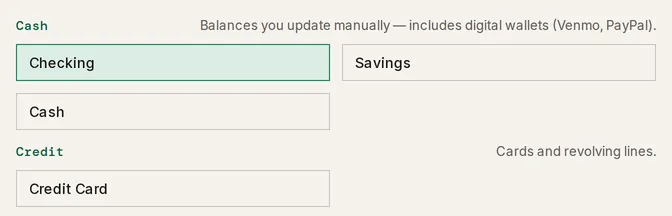
Pick an Account type. Cash covers checking, savings, and cash balances you update by hand.
-
Enter a Name. Add an Institution and Notes if you want them. The name is required. Leaving it blank shows Name is required. when you submit.
-
Click Create account. The account opens in its drawer, ready for a balance.
How do I keep a manual account’s balance current?
Section titled “How do I keep a manual account’s balance current?”A manual account updates only when you set it. Open the account and record a new balance whenever it changes.
-
On Accounts, click the account. Its drawer opens with the current balance and a Set balance button.
-
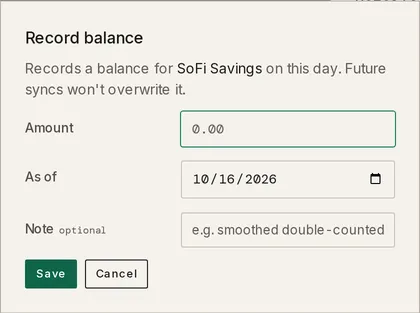
Click Set balance. The Record balance modal opens.
-
Enter an Amount and the date it is As of. Add a Note if the day needs one. A blank amount shows Enter an amount.
-
Click Save. The balance is recorded for that date and holds until you change it.
When a manual account’s balance goes unrecorded for long enough, Accounts shows a banner naming it, balance is 30 days out of date, with the date of the last snapshot. The interval is the account’s Reminder cadence, set under Advanced status in its Manage band: Monthly (30 days), Bi-monthly (60 days), Quarterly (90 days), or Never. Recording a balance clears the banner.
What does the balance history look like?
Section titled “What does the balance history look like?”Each balance you record is a dated point. The account drawer’s Balance history band, headed with its day count and how many of them are manual, lists every day with its date, balance, change, and source. A balance you typed is marked manual. To correct many days at once, export daily balances, edit them, and re-import — see the Balance history tab in CSV & PDF importers.
Troubleshooting
Section titled “Troubleshooting”I can’t create a loan, mortgage, or HELOC here.
Section titled “I can’t create a loan, mortgage, or HELOC here.”Picking Loan or HELOC shows Loans are managed in Debt — Continue goes there. and replaces Create account with Continue →, which opens the Track a debt form on Debt. Its account picker’s first choice, Track the balance manually, creates the manual account for you alongside the debt. Picking Mortgage shows Mortgages are managed in Real Estate — Continue goes there. and Continue → opens Real estate. Pick a cash, credit, or investment type to stay on this form.
“Name is required.”
Section titled ““Name is required.””The account can’t be created without a name. Type one in the Name field, then click Create account again.
“Enter an amount.”
Section titled ““Enter an amount.””The Record balance modal was saved with Amount blank. Type the balance, then click Save.
The balance stays the same and never updates.
Section titled “The balance stays the same and never updates.”A manual account has no bank connection, so nothing refreshes it. Record the new figure with Set balance each time it changes; the balance holds until you do.
There’s no Set balance button on the account.
Section titled “There’s no Set balance button on the account.”A few accounts take their value from elsewhere: a property’s value is edited on its Real Estate page, and an equity account’s value comes from your equity records. Those show no Set balance — update them where they are managed.
Can I delete a manual account?
Section titled “Can I delete a manual account?”Yes — open the account, click Delete account…, and type DELETE ACCOUNT to confirm. Deleting erases the account’s net-worth history across every past date and can’t be undone. To keep that history but drop the account from today’s totals, click Archive instead.
Does a manual account ever sync on its own?
Section titled “Does a manual account ever sync on its own?”No. A manual account never connects to a bank, so no sync touches its balance. You record each balance yourself with Set balance.
Can I add transactions to a manual account?
Section titled “Can I add transactions to a manual account?”Yes. A manual account appears in the account picker on the Transactions page’s + Add transaction form, where you enter the date, merchant, amount, and category by hand. A negative amount is an outflow, a positive one an inflow.
Do manual accounts count in net worth and reports?
Section titled “Do manual accounts count in net worth and reports?”Yes. A manual account is counted like any other account. A manual investment account is the one nuance: its value comes from the holdings you enter, not from a balance you type, so record its positions rather than a single figure.
Can I import balances instead of typing each day?
Section titled “Can I import balances instead of typing each day?”Yes. The Balance history tab on the Import page reads a CSV of dated balances into an account, which backfills the net-worth chart for dates before you started tracking it. See CSV & PDF importers.