Privacy & sharing
What we send to AI
What each AI feature sends to Anthropic's Claude, and what stays inside Taiga Finance.
Taiga Finance’s AI features run on Anthropic’s Claude. Everyday categorization sends a merchant name, the account type, and whether money moved in or out — never an amount, a date, or an account number. The chat assistant and the statement and screenshot imports send more, and each one says what it sends before it runs. Turning off Smart categorization & enrichment in Settings stops it all.
What is the AI in Taiga Finance?
Section titled “What is the AI in Taiga Finance?”Taiga Finance uses Anthropic’s Claude for a few narrow jobs: turning a cryptic bank line like SQ *BLUE BOTTLE into a readable merchant and category, spotting recurring bills and card fees, answering questions in the chat assistant, and reading a statement or screenshot you import. AI is on by default and runs on Anthropic’s commercial API. Each feature sends only the slice of data its job needs.
Which features use AI, and what does each send?
Section titled “Which features use AI, and what does each send?”Every AI feature is listed here with the data that leaves Taiga Finance for it. Anything not listed for a feature is not sent.
| Feature | What leaves Taiga Finance for Anthropic |
|---|---|
| Merchant cleanup and categorization | The merchant or bank-description text, the account type, and whether money moved in or out. |
| Recurring detection | Merchant names, to classify which ones are typically recurring. For a row that looks like a card’s annual fee, the account name, that one fee amount, and the list of candidate cards. |
| Import assist: columns | The shape of each CSV column, its header, how often it matches, its value range, never a cell value. |
| Import assist: categories | For a category the import could not map on its own, the category name as your old tool spelled it, its row count, a few of the merchant names under it, and your own category list to pick from. |
| Import assist: accounts | The import’s account names and your account names, with the last four digits of any account number stripped first. |
| Budget setup from a phrase | The budgeting phrase you type. |
| Chat assistant | Your figures, transactions, balances, and budgets, pulled as a question needs them, plus the help center. |
| PDF statement import | The whole statement, as text and as page images. |
| Equity screenshot or paste import | The whole screenshot, or the text you paste. |
| Points screenshot import | The whole screenshot. |
What do the everyday features hold back?
Section titled “What do the everyday features hold back?”Categorization runs on nearly every transaction, so it sends the least: the merchant text, the account type, and the sign of the amount. It never sends the amount itself, a date, an account name or number, or your login details. Answers are cached, so the same merchant is never sent twice.
The one everyday feature that sends a figure is card-fee detection. To name the card behind an annual fee, it sends the account name, the one fee amount it is checking, and the cards it could be. It never sends the rest of the ledger.
What can the chat assistant see?
Section titled “What can the chat assistant see?”The chat assistant is the feature that sends real figures. Its first-open notice says so: Answers are generated by Claude (Anthropic) from your financial data and the help center. To answer a question it reads your transactions, balances, and budgets, and sends the relevant ones to Claude. It only reads, and never changes a transaction, a budget, or a setting. It reads what you are shown, under the same household visibility rules as the pages: the other member’s private rows and Separate accounts never reach it.
Which imports send a whole document?
Section titled “Which imports send a whole document?”Three imports read a file with AI, so the whole file is sent. A PDF statement goes to Claude as text and as page images — everything printed on it, including a full account number and a mailing address. An equity screenshot and a points screenshot are sent as images, so everything visible in them goes too.
Taiga Finance deletes a PDF from its server the instant the reading step returns, whether it succeeded or failed. A screenshot is never written to Taiga Finance’s server at all; it is read and discarded within the same request. Both go to Claude inside the request itself. This is not a zero-retention agreement: Anthropic’s ordinary commercial terms govern what they keep. Each of these imports has a per-day limit, and the tile says so when it is reached.
How do I turn AI off?
Section titled “How do I turn AI off?”-
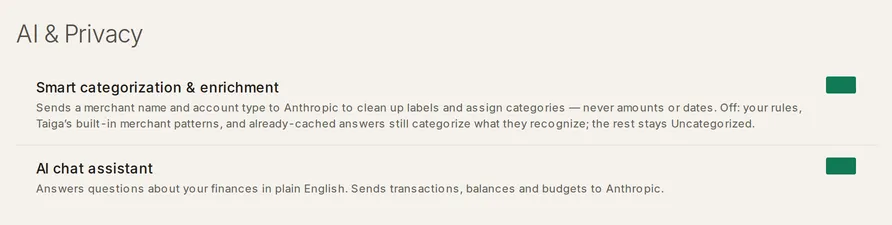
Open Settings and scroll to the AI & Privacy band.
-
Turn off Smart categorization & enrichment. This is the master switch. With it off, Taiga Finance stops asking Claude. Your rules, Taiga Finance’s built-in merchant patterns, and answers already cached still categorize what they recognize, and the rest stays Uncategorized. The chat assistant is unavailable, and PDF import is blocked.
-
To keep categorization but stop the assistant, leave the master switch on and turn off AI chat assistant instead.
AI is household-effective. When anyone you share accounts with turns off Smart categorization, AI is off for the shared data for everyone, and the AI & Privacy band names who turned it off. Your own switch stays as you set it and applies again when AI is back on for the household.
Troubleshooting
Section titled “Troubleshooting”“Turn on AI in Settings”
Section titled ““Turn on AI in Settings””A feature that needs AI shows this while AI is off, the PDF statement import tile for one. Turn on Smart categorization & enrichment in the AI & Privacy band, then reopen the feature.
“AI is off for your household — [name] turned it off in their settings.”
Section titled ““AI is off for your household — [name] turned it off in their settings.””Someone you share accounts with turned off Smart categorization, and the strictest setting wins for shared data. AI stays off until they turn it back on. Your own preference is saved and applies again then.
The AI chat assistant switch is greyed out, “Unavailable while Smart categorization is off.”
Section titled “The AI chat assistant switch is greyed out, “Unavailable while Smart categorization is off.””The chat assistant runs on top of the master switch. Turn on Smart categorization & enrichment first, and the chat switch becomes available.
“Daily PDF-import limit reached — please try again tomorrow.”
Section titled ““Daily PDF-import limit reached — please try again tomorrow.””Each whole-document import (PDF statement, equity capture, points screenshot) has a per-user daily cap, because the call has no fallback. The count resets the next day.
Is AI on by default?
Section titled “Is AI on by default?”Yes. Both switches — Smart categorization & enrichment and AI chat assistant — ship on. Either one turns off on its own in the AI & Privacy band in Settings.
Does Anthropic train on the data Taiga Finance sends?
Section titled “Does Anthropic train on the data Taiga Finance sends?”No, by Anthropic’s terms. Anthropic’s commercial API terms state that data sent through the API is not used to train their models by default, and Taiga Finance uses that commercial API. This is Anthropic’s contractual position, not something Taiga Finance enforces in its own code.
Can I keep categorization but turn off the chat assistant?
Section titled “Can I keep categorization but turn off the chat assistant?”Yes. The two switches are independent. Turn off AI chat assistant and leave Smart categorization & enrichment on. The reverse is impossible: the chat assistant needs the master switch on, so turning that off disables chat as well.
Can my partner turn AI off for me?
Section titled “Can my partner turn AI off for me?”For shared data, effectively yes. AI is off for the household when any member turns off Smart categorization, since the strictest setting wins. Your own switch is never changed, and your preference applies again once AI is back on for the household.