Using Taiga Finance
Switch a fund to spending
Turn a savings fund into a fixed budget for the event it was saved for, then close it out when the event is over.
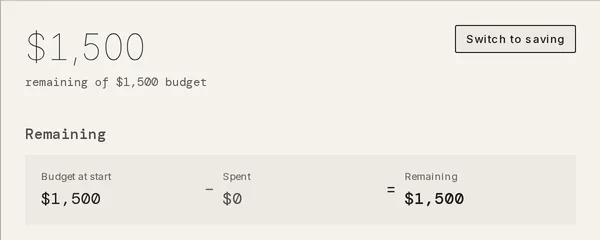
When the trip or the roof a fund was saved for arrives, switching the fund to spending tracks what is left of the money instead of how close it is to the target. Open the fund on Savings and click Switch to spending in the corner of its drawer. The balance at that moment is frozen as Budget at start. Purchases tagged to the fund count as Spent, and Remaining is what is left. Switch to saving reverses the switch, and Close out archives the fund and returns or moves what is left.
What is spending mode?
Section titled “What is spending mode?”A fund is either saving or spending. Family travel sinking holds $1,500 toward an $8,000 target for a summer trip. Once the trip starts, spending mode shows how much of that $1,500 is left instead of the gap to $8,000. Switching moves no money and changes no allocation. It only changes what the fund measures.
How do I switch a fund to spending?
Section titled “How do I switch a fund to spending?”-
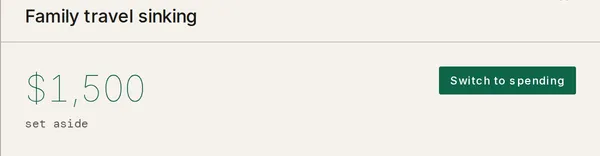
On Savings, open the fund. Its drawer opens with the balance and the words set aside under it.
-
Click Switch to spending in the top-right corner of the drawer.
-
The drawer now reads remaining of $1,500 budget, and the corner button reads Switch to saving.
-
Tag each purchase from the event with Funded by in the transaction’s drawer, as you would while saving. Each tagged purchase adds to Spent and lowers Remaining. See how transactions count against a fund.
A fund with no savings line on Plan gets one at $0 a month when it switches, so purchases can be tagged to it. The line stays if you switch back.
Can I switch from the Savings list?
Section titled “Can I switch from the Savings list?”Yes, on a fund that is Funded and has a target month. Click the fund’s status chip on Savings. Its menu lists Open fund and Switch to spending, and the second one switches the fund without opening the drawer.
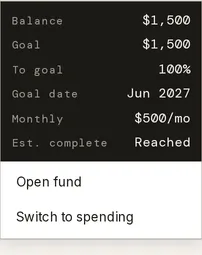
Any other fund switches from its drawer only.
What does a fund show while spending?
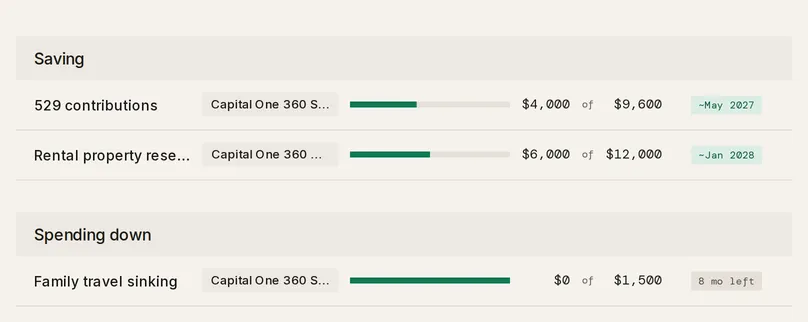
Section titled “What does a fund show while spending?”Once any fund is spending, Savings splits its list into a Saving section and a Spending down section. A spending fund’s row reads the amount spent of the budget, like $0 of $1,500.
The status chip states what is left in time, never a pace:
- The months to the fund’s target month, like 8 mo left. It reads this month in the target month and passed after it.
- No date when the fund has no target month.
- Spent once the balance reaches zero.
- Over budget when tagged spending takes the balance below zero. The row then shows Cover → in place of the chip, which opens the allocation drawer for the fund’s account.
How do I switch back to saving?
Section titled “How do I switch back to saving?”Click Switch to saving in the fund’s drawer. Budget at start is discarded, and the fund reads its balance against its target again. The balance itself does not change, and every purchase tagged with Funded by stays tagged. Switching to spending again later freezes a new budget at the balance on that day.
How do I close out a fund?
Section titled “How do I close out a fund?”-
On Savings, open the spending fund.
-
Click Close out, below Funded spends in the drawer. A fund in saving mode has no Close out button.
-
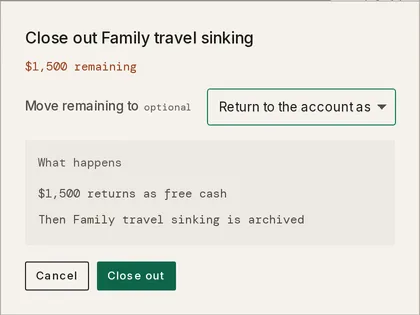
The Close out window shows the amount remaining. Under Move remaining to, leave Return to the account as free cash, or pick another fund on the same account to receive it.
-
Click Close out, or Move & close out when a fund is picked. Taiga Finance archives the fund, which removes it from Savings and its savings line from Plan. If it fails, the window reads Couldn’t close out the fund. Try again.
An archived fund is listed on Savings under More actions › Archived funds, at /savings/archived. Each row has Restore and Delete. Restore brings the fund back at $0 allocated. Delete permanently removes a fund that has no spending or allocation history.
Troubleshooting
Section titled “Troubleshooting”Switch to spending shows “This change wasn’t saved.”
Section titled “Switch to spending shows “This change wasn’t saved.””The fund’s Basis is Percentage or Whole account. Those claims follow the live account balance, so there is no fixed amount to freeze as a budget. In the drawer’s allocation band, set the Basis to Fixed, then click Switch to spending again.
Percentage and Whole account are greyed out with “Finish spending down first”.
Section titled “Percentage and Whole account are greyed out with “Finish spending down first”.”A spending fund keeps a fixed allocation while its budget is frozen. Click Switch to saving first, then change the Basis.
The status chip’s menu has no Switch to spending item.
Section titled “The status chip’s menu has no Switch to spending item.”The menu offers it only on a fund that is Funded and has a target month. Use Switch to spending in the fund’s drawer instead, which works on any fund with a fixed allocation.
The Move remaining to picker doesn’t list a fund.
Section titled “The Move remaining to picker doesn’t list a fund.”The picker lists only other funds with a Fixed basis on the same account as the fund being closed out. Funds on other accounts and funds that follow the balance are left out. To list a fund on the same account, set its Basis to Fixed in its drawer first.
Can I undo switching to spending?
Section titled “Can I undo switching to spending?”Yes. Switch to saving in the fund’s drawer reverts it and discards the frozen budget. Purchases tagged in the meantime stay tagged and still count against the balance.
What happens to purchases already tagged to the fund?
Section titled “What happens to purchases already tagged to the fund?”They stay tagged and don’t count as Spent. They lowered the balance before the switch, so Budget at start already excludes them. Spent counts only what lowers the balance after the switch.
Can I archive a fund without closing it out?
Section titled “Can I archive a fund without closing it out?”Yes. Archive fund at the foot of the drawer works in either mode. Its allocation returns to the account as free cash, the same as a close-out with no fund picked.
Can a fund with no target month switch to spending?
Section titled “Can a fund with no target month switch to spending?”Yes, from its drawer. Its status chip then reads No date. The shortcut in the status chip’s menu needs a target month.
Does my partner see the switch?
Section titled “Does my partner see the switch?”On a shared fund, yes. Either member can switch a shared fund or close it out, and both see it under Spending down. A private fund is its owner’s alone. See Couples & household visibility.