Using Taiga Finance
Home equity & HELOC
How the equity in a home is figured, and how a HELOC drawn against it is tracked.
Home equity is a property’s value minus every loan secured against it — a mortgage and a HELOC alike. Taiga Finance tracks that figure for each home and across your properties. A HELOC, a home equity line of credit, borrows against that equity: a revolving loan secured by the home. Taiga Finance tracks it as a debt linked to the property: it lowers your equity while it carries a balance, and subtracts from your net worth in the Home Equity band.
What is home equity?
Section titled “What is home equity?”On Real estate, each home lists its Value, your Equity, and the Debt against it. Taiga Finance’s family household owns a Spokane rental worth $285,000 with a $32,000 HELOC and no mortgage, so it lists $253,000 of equity. When a home is worth less than the debt against it, its equity shows as $0 rather than a negative, and the shortfall stays visible in your net worth.
How is my equity built up over time?
Section titled “How is my equity built up over time?”Taiga Finance rebuilds your equity month by month: each month’s property value minus the secured debt that month. The value comes from your valuation history, carried between points by the FHFA index — see Property. A mortgage balance is walked down its amortization schedule and pinned to any imported statements — see Mortgage and Mortgage payoff. A HELOC revolves, so it has no schedule to reconstruct; Taiga Finance holds it at its current balance for the months you have owned the home. The Real estate page shows the running total as Total equity, and Reports breaks it out over time.
How is a HELOC tracked?
Section titled “How is a HELOC tracked?”A HELOC is tracked as a debt, not on Real estate. You add it on Debts with Type set to HELOC, and tie it to a home with the Secured property field, which starts at Unlinked. Once linked, the HELOC shows on the property page as a loan card stacked under the mortgage’s, and in Property settings under Loans.
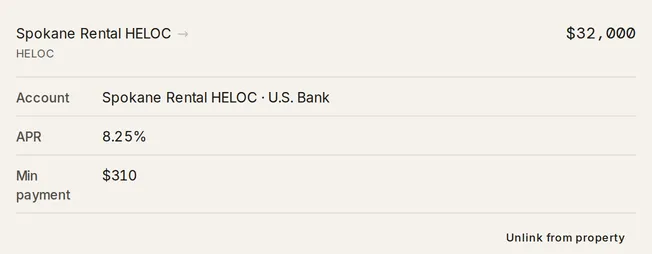
The card is read-only and carries the HELOC’s APR, its Min payment, and the account it sits on in the Account row. The name opens that account. Unlink from property, in Property settings, detaches it from the home. To change the balance, APR or payment, edit the HELOC on Debts, where it is a full, editable row.
Where does a HELOC land in my net worth?
Section titled “Where does a HELOC land in my net worth?”A HELOC subtracts from your net worth in its own band, Home Equity — separate from the Mortgage band a first mortgage falls in. The property’s value still adds to the Real Estate band in full. Reports shows the same bands over time under net-worth composition.
Troubleshooting
Section titled “Troubleshooting”The HELOC isn’t on the property’s loan card.
Section titled “The HELOC isn’t on the property’s loan card.”It isn’t linked to that home yet. Link it from the property with Link an existing loan, or set Secured property when you add the HELOC on Debts. Until it is linked, the HELOC still counts in what you owe, but it does not reduce that home’s equity.
The HELOC has no rate, so its payoff won’t project.
Section titled “The HELOC has no rate, so its payoff won’t project.”The payoff plan needs an APR to project the balance. Without one it holds the HELOC at its minimum payment and shows no payoff month, and the rate cell reads Add APR until you set one. On Debts, select the HELOC’s rate cell and enter the rate, or open the debt and set APR (%).
Can I unlink a HELOC without deleting it?
Section titled “Can I unlink a HELOC without deleting it?”Yes. Unlink from property on the loan card removes the property link only. The HELOC stays on Debts with its balance, rate and payment. It stops affecting that home’s equity, but still counts in what you owe.
Does a HELOC behave like a mortgage?
Section titled “Does a HELOC behave like a mortgage?”No. A mortgage is added and edited on Real estate; a HELOC is added and edited on Debts and only linked to the home. On the property it shows read-only, and on Debts it is a full, editable row.
Can Taiga Finance pull my HELOC balance automatically?
Section titled “Can Taiga Finance pull my HELOC balance automatically?”Yes, if it sits on a synced account. Pick the connected account under Linked account when you add the HELOC on Debts, and the balance follows it on every sync. A HELOC you track manually keeps the balance you enter.
Is a HELOC part of my debt payoff plan?
Section titled “Is a HELOC part of my debt payoff plan?”Yes, by default. A HELOC is an editable row on Debts and starts in the payoff plan, where the plan projects it at its APR. Switch it off there to leave it out. See Debts for how the plan runs.