Using Taiga Finance
Property
Add a property, set its value by hand or from the FHFA area index, and keep its valuation history.
A property is how Taiga Finance tracks a home you own — what it is worth, and the record behind that number. You add one on Real estate: a name, a type, and, if you have it, what the home is worth today. From then on the value is either a figure you keep by hand or an estimate Taiga Finance carries forward from the FHFA area index. Every change pins a dated point in the property’s valuation history. When you sell, you mark the property sold and it moves to your archived accounts.
What is a property in Taiga Finance?
Section titled “What is a property in Taiga Finance?”A property is a manually kept record of a home — your primary residence, a rental, or a second home. It holds the home’s current value and the facts around it: when you bought it, for how much, and where it is. That value counts toward your net worth. A property never syncs from a bank, so the number is yours to keep current — either by editing it yourself or by letting Taiga Finance index it from public housing data. The mortgage against the home is a separate record you attach. See Mortgage.
How do I add a property?
Section titled “How do I add a property?”-
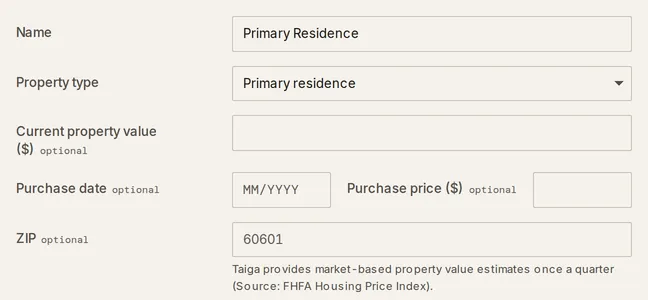
On Real estate, select Add property. The Add property form opens.
-
Enter a Name and pick a Property type — Primary residence, Rental, or Second home.
-
Set Current property value if you know it. Leave it blank and Taiga Finance estimates the value from the area index once a ZIP resolves a region.
-
Add a ZIP to turn on the area-index estimate. The field’s hint names the source: a market-based estimate once a quarter, from the FHFA Housing Price Index.
-
Add a Purchase date and Purchase price if you have them. A Label / description and Notes are optional.
-
Select Add property. Taiga Finance saves the property and opens it. The name defaults to Primary Residence if you leave it empty.
The form collects the property only. You attach a mortgage or HELOC afterward, from the property’s Financing block — see Mortgage and Home equity & HELOC.
How is a property’s value set — by hand or from the FHFA index?
Section titled “How is a property’s value set — by hand or from the FHFA index?”A property’s current value has one of two sources, shown on the Value and FHFA rows of its settings. Open Property settings from the property to see them.
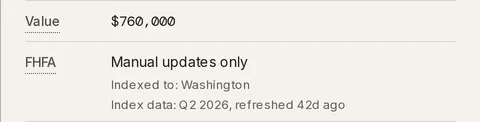
- Manual updates only — you type the value on the Value row. It stays put until you change it. This is the default.
- FHFA estimates — Taiga Finance re-values the home each quarter from the area index. Switch to it on the FHFA row.
The estimate is area-level, not a per-home appraisal. Taiga Finance takes your most recent value — or the purchase price if you have entered no value — and scales it by how the whole state or metro moved in the FHFA Home Price Index. The Indexed to: line names that area.
With either source, hovering the property’s value on its page shows the working: the Method, when the value was Updated, and, where the index can estimate the home, an FHFA estimate row with how far your value sits from it. That row changes nothing; the value moves only when you edit it or turn on FHFA estimates.
-
On the FHFA row, choose Enable FHFA estimates. It needs a ZIP so Taiga Finance can resolve a state or metro.
-
Taiga Finance promotes the latest estimate to the Value row and pins it in the valuation history. From then on each quarterly refresh updates it.
-
To go back to a fixed number, choose Manual updates only and set the Value yourself.
How do I keep a record of what a property was worth?
Section titled “How do I keep a record of what a property was worth?”Every time you save a new Value, Taiga Finance pins a dated snapshot in Valuation history. The list is the audit trail behind the current number and the anchors for the value-over-time chart.
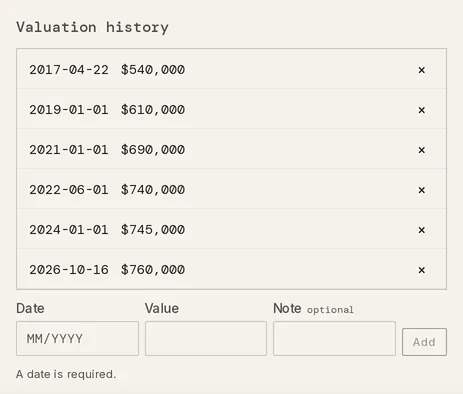
- Add a past point — an appraisal, a refinance, an old estimate — with the inline Date, Value, and Note row below the list.
- Between snapshots the chart interpolates the value with the FHFA index when a region is set, and linearly otherwise.
- Remove a manual snapshot with its ×. Snapshots that came from the FHFA index or a sale are managed automatically and cannot be deleted.
How do I mark a property sold?
Section titled “How do I mark a property sold?”-
Open Property settings, and under Manage select Mark as sold….
-
Enter a Sale price and Sale date. Taiga Finance starts the date at the current month and the price at the current value.
-
Select Mark as sold. The sale price becomes the final point on the value chart, and the property is archived — restorable from View archived on Accounts. Any linked mortgage keeps its history.
Troubleshooting
Section titled “Troubleshooting”The FHFA row is locked to “Manual updates only · add a ZIP to enable FHFA estimates.”
Section titled “The FHFA row is locked to “Manual updates only · add a ZIP to enable FHFA estimates.””Without a ZIP, Taiga Finance can’t resolve a state or metro to index against, so the estimate can’t run. Add a ZIP on the ZIP row. Once it resolves a region, Enable FHFA estimates unlocks.
A valuation’s × is greyed out with “snapshots are managed automatically.”
Section titled “A valuation’s × is greyed out with “snapshots are managed automatically.””The snapshot came from the FHFA index or a recorded sale, not from you, so it belongs to that source. Only snapshots you entered by hand can be deleted. To stop new FHFA snapshots, switch the FHFA row back to Manual updates only.
Turning on FHFA estimates doesn’t move the value.
Section titled “Turning on FHFA estimates doesn’t move the value.”The estimate needs an anchor — a value or a purchase price with its date — and a resolved region. With neither anchor it has nothing to carry forward. Enter a value or a purchase price, and check that the Indexed to: line names a state or metro.
Can I undo marking a property sold?
Section titled “Can I undo marking a property sold?”Yes. A sold property is archived, not deleted, so restore it from View archived on Accounts. It comes back with the sale price and date still set — clear them by editing the property if the sale was a mistake.
Does the FHFA estimate update on its own?
Section titled “Does the FHFA estimate update on its own?”Yes, once you turn it on. Each quarterly index refresh, Taiga Finance promotes the latest estimate to the property’s value and records it in the valuation history.
Does the estimate look at my specific home?
Section titled “Does the estimate look at my specific home?”No. It is an area-level index — your last known value carried by how the whole state or metro moved in the FHFA Home Price Index. It is not a per-home appraisal, an automated valuation of your address, or a listing price.
What happens to the mortgage if I delete the property?
Section titled “What happens to the mortgage if I delete the property?”The loan stays in your books. It only loses the link to the property, and its bank connection is untouched. Deleting a property is permanent, though you can re-add it. To keep the record instead, mark the property sold rather than deleting it.
Where does a property’s value show up?
Section titled “Where does a property’s value show up?”In the Real Estate band of your net worth and on the Real estate overview. See Real estate for how value, mortgage, and equity combine into home equity, and Reports for the same figures over time.