Using Taiga Finance
Payoff strategies
What each view of the Payoff section on Debt does with your payments, and what each figure counts.
The Payoff section on Debt projects every debt in your payoff plan forward together: the month the last one clears, the interest left to pay before then, and the order the balances fall. It reads that projection three ways. As planned pays each debt the payment you set for it. Avalanche and Snowball spend the same monthly total but aim every dollar above the minimums at one debt at a time, by highest rate or by smallest balance. Switching views changes what the page shows, not what you pay. Nothing in the section moves money or saves a setting.
What is the payoff readout?
Section titled “What is the payoff readout?”The readout sits below the ledger on Debt. It answers one question for a household with several balances: at today’s payments, when is the last one paid off, and what does it cost? A household with a card, a car loan and a HELOC pays three lenders three amounts. The readout runs those payments month by month at each debt’s rate and states the end. The views then show what the same money would do if it were aimed at one debt at a time.
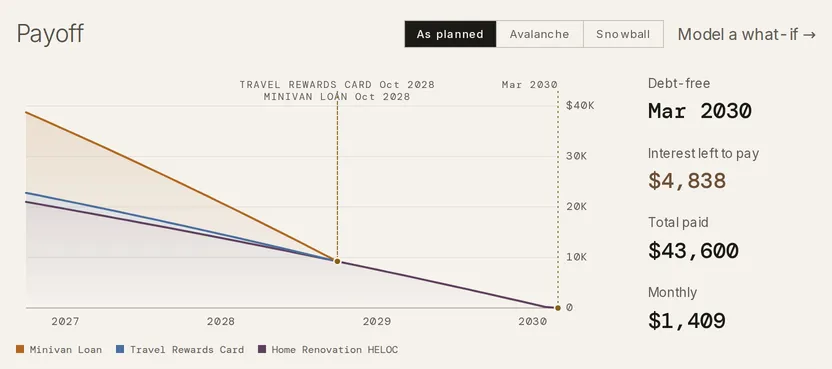
The view you pick drives the whole page. The payoff month beside each row in the ledger, the chart and the figures all read the same view. The page opens on As planned each time; the pick is not saved.
What does As planned show?
Section titled “What does As planned show?”As planned pays each debt its own planned payment, the /mo figure on its row, and its minimum where the row has none. Each payment holds at today’s figure until its debt clears, and then it stops. Nothing moves from a cleared debt to another one. It is the view the page opens on, and the one the Debt snapshot on Today reads.
In the example plan, the Travel Rewards Card pays its $95 minimum, the Minivan Loan its $714 installment, and the Home Renovation HELOC a planned $600 against a $250 minimum. The card and the loan clear in Oct 2028 and the HELOC in Mar 2030. That is the household’s Debt-free month under As planned, with $4,838 of interest left to pay.
What does the Avalanche view change?
Section titled “What does the Avalanche view change?”Avalanche spends the monthly total of As planned. Every debt gets its minimum first. Every dollar above the minimums goes to the debt with the highest rate. When that debt clears, its payment moves to the next-highest rate, so the monthly total stays the same until the last balance is gone.
The rate is the one in force that month. A card on a promotional rate ranks by its promo rate until the promo ends, then by its regular APR. Between two debts at the same rate, the smaller balance comes first.
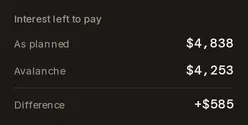
In the example plan, the $350 the HELOC’s planned payment carries above its minimum goes to the Travel Rewards Card at 22.74% instead. The card clears in Mar 2027, and its payment then moves to the HELOC at 8.49%. The HELOC clears in May 2029, ten months before its As planned month, and the Minivan Loan still clears in Oct 2028. The same $1,409 a month leaves $4,253 of interest to pay instead of $4,838.
What does the Snowball view change?
Section titled “What does the Snowball view change?”Snowball spends the same total as Avalanche and moves a cleared debt’s payment the same way. The order is by balance instead of rate: the smallest balance first. The order is set from today’s balances and holds for the whole projection. Between two debts with the same balance, the higher rate comes first.
When the debt with the highest rate is also the smallest, the two views start with the same target and part only after it clears. In the example plan the Travel Rewards Card is both, so Avalanche moves its payment to the HELOC at 8.49% next and Snowball to the smaller Minivan Loan.
How do I read the chart and the figures?
Section titled “How do I read the chart and the figures?”The chart stacks one band per debt, with the debt that clears first on top. Each band pinches to zero at its payoff month, and a dotted marker names the debt and the month. Hovering the chart reads each balance in a month.
- Debt-free is the month the last balance in the plan clears.
- Interest left to pay is the interest from now until then. Interest already paid is not in it.
- Total paid is that interest plus the principal.
- Monthly is the plan’s monthly total: the minimums plus what the planned payments add above them.
Each figure opens its working on hover or focus. The Debt-free working lists the horizon, the monthly total split into the minimums and the rest, and every debt’s payoff month in order. Interest left to pay sets the view’s interest beside another view’s, with the Difference: As planned against Avalanche, and Avalanche and Snowball against each other.
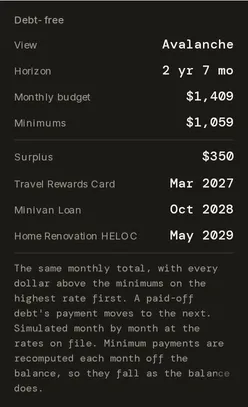
A card’s minimum is recomputed each month from its balance, so it falls as the balance does. Under Avalanche and Snowball, the difference joins the Surplus. Under As planned, each payment holds at today’s figure. A loan’s minimum is its fixed installment. Taiga Finance gives no per-debt “on track” or “behind” verdict, and never estimates a payoff date from your past payments.
What does Balance grows mean?
Section titled “What does Balance grows mean?”A plan whose payments never get ahead of their interest has no end month. Balance grows then takes the place of Interest left to pay and Total paid, with how much the balance rises each month, or flat when the payment exactly meets the interest. Its working lists the month’s interest against the payment. Debt-free reads a dash, because the plan never clears.
What happens to a debt without a rate?
Section titled “What happens to a debt without a rate?”A debt in the plan with no APR on file can’t be projected, so Taiga Finance holds it at a fixed payment for the whole projection and leaves it out of the math. Under As planned that is its planned payment; under Avalanche and Snowball, its minimum today. It never takes extra dollars, and its payment never moves to another debt. Its row reads Add APR.
Every debt with a rate is still projected and keeps its own payoff month on its row. Debt-free, Interest left to pay and Total paid read a dash until every debt in the plan has a rate, because the household’s end month can’t be stated while one balance has no projection.
How do I model a what-if?
Section titled “How do I model a what-if?”Model a what-if → opens Debt payoff under Scenarios, with the view you picked set as its Strategy. There you can add an Extra monthly amount or a One-time payment, and each figure reads against the plan without the moves. A scenario there can be saved and compared. It never changes the readout on Debt. See Scenarios.
Troubleshooting
Section titled “Troubleshooting”“Debt-free” shows a dash while other debts have payoff months.
Section titled ““Debt-free” shows a dash while other debts have payoff months.”One debt in the plan has no rate on file, so the household figure can’t be stated. Its row reads Add APR. Add an APR on that row, and Debt-free, Interest left to pay and Total paid fill in.
The figures read “Balance grows” instead of interest.
Section titled “The figures read “Balance grows” instead of interest.”At least one debt’s payment doesn’t cover its monthly interest. The figure’s working names the interest and the payment. Balance grows gives way to the interest figures once that debt’s /mo planned payment is above the interest it shows, or once a wrong rate on file is corrected.
Avalanche and Snowball show the same payoff months.
Section titled “Avalanche and Snowball show the same payoff months.”When the highest-rate debt is also the smallest, the two views share a first target. With one debt, they always match. When no row has a planned payment above its minimum, there are no extra dollars to aim at first. The views then part only as a card’s minimum falls or a cleared debt frees its payment.
The page went back to As planned.
Section titled “The page went back to As planned.”The view is not saved. Debt opens on As planned each time, and picking another view lasts until you leave the page.
Does the payoff readout move money or make payments?
Section titled “Does the payoff readout move money or make payments?”No. Your payments are what you pay your lenders, recorded as transactions like any other. Picking a view changes neither your accounts nor the planned payment on any row.
Does the mortgage count?
Section titled “Does the mortgage count?”Only once you add it to the plan. A mortgage starts outside the payoff plan. With its In payoff plan switch on, it joins the projection at its principal and interest plus any extra payment in its terms, never its escrow. It is ranked by its rate or balance like any other debt. See Mortgage payoff for the loan on its own.
What if a payment only covers the interest?
Section titled “What if a payment only covers the interest?”That debt never clears. See What does Balance grows mean? A payment that exactly meets the interest reads flat.
Which view costs less interest?
Section titled “Which view costs less interest?”The working states it for your plan. Under As planned, the Interest left to pay working sets its interest beside the Avalanche figure. Under Avalanche, the Interest left to pay working sets its interest beside the Snowball figure with the Difference, and reads same when the two are under a dollar apart.
Is the payoff readout advice?
Section titled “Is the payoff readout advice?”No. It states what each view does with your numbers. Taiga Finance doesn’t pick a view for you or say one is right. The figures are an estimate from the rates and payments on file.