Using Taiga Finance
Target mix
Give a portfolio a share for each asset class and read how far its holdings sit from those shares.
A target mix is the share of a portfolio you mean to hold in each asset class. On Investments, open the portfolio’s strip and click Set targets: seven percentages that total 100%, plus a drift threshold. The strip then lists each class’s current share beside its target and reads On target or Off target.
What is a target mix?
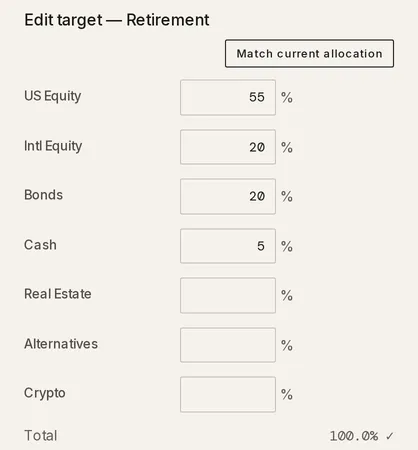
Section titled “What is a target mix?”A target mix belongs to one portfolio. A household might plan its retirement accounts as 55% US stocks, 20% international, 20% bonds and 5% cash. As prices move, the real split wanders from that plan, and the portfolio’s strip shows both side by side.
How do I set a target mix?
Section titled “How do I set a target mix?”A portfolio created with a Kind other than Equity Comp starts with that kind’s default target, so its strip offers Edit targets from the start.
-
On Investments, click the portfolio’s pill above the ledger. A strip opens with the portfolio’s name, its value and its actions.
-
Click Set targets, which reads Edit targets on a portfolio that already has one.
-
Type a percentage in each asset-class row. There are seven, from US Equity to Crypto, and a blank row counts as 0%. Match current allocation fills every row with the portfolio’s current shares.
-
Check the Total row. It reads 100.0% with a ✓ once the rows add up, and a half-point of rounding either way is accepted. Until then it reads Must equal 100%. and the save button stays disabled.
-
Set Alert when any class drifts past, in percentage points (pp). It starts at 5 and decides when the strip reads Off target. A value outside 0.5 to 50 reads Must be between 0.5 and 50 pp.
-
Click Set target, or Save on an existing target. The strip shows the comparison.
How do I read the comparison strip?
Section titled “How do I read the comparison strip?”Under the portfolio’s name and value, the strip lists each asset class as its current share, an arrow and its target share, captioned Current → Target. A class with neither a current share nor a target share is left out.
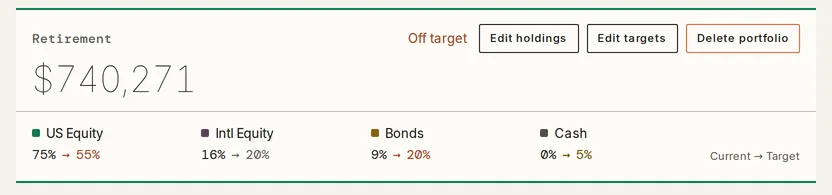
The strip reads On target while every class’s gap between current and target is smaller than your threshold, and Off target once any gap reaches it.
Search and filters narrow the ledger inside the portfolio and leave the strip’s numbers alone.
What do the percentages count?
Section titled “What do the percentages count?”The shares count only holdings with an asset class. The value of any holding Taiga Finance could not classify shows under the strip as a figure followed by unclassified, and clicking it narrows the ledger to those holdings. The target dialog notes the same figure as outside these percentages. A holding’s class is set in its drawer, described in Edit a holding.
How do I change or remove a target?
Section titled “How do I change or remove a target?”-
On Investments, click the portfolio’s pill, then Edit targets.
-
Change any row or the threshold, and click Save.
-
To drop the target instead, click Remove target, then Confirm remove. The strip goes back to the portfolio’s name, value and actions.
Troubleshooting
Section titled “Troubleshooting”The strip shows a value but no percentages.
Section titled “The strip shows a value but no percentages.”The portfolio has no target yet. Click Set targets on the strip and save a mix that totals 100%.
The comparison strip is not on the page.
Section titled “The comparison strip is not on the page.”No portfolio is selected. Click a portfolio’s pill above the ledger. With no pills there, create a portfolio first.
The strip reads “Drift needs every position’s value.”
Section titled “The strip reads “Drift needs every position’s value.””A holding in the portfolio has no reported value, so no share can be worked out. The line under the value counts such holdings, as in excludes 1 position with no reported value, and the ledger shows their value as “—”. The comparison returns once a sync or an imported file supplies a price.
The save button is disabled and the dialog says “Must equal 100%.”
Section titled “The save button is disabled and the dialog says “Must equal 100%.””The rows add up to more or less than 100%. Adjust a row until Total shows the ✓. A row below 0 or above 100 reads A weight must be between 0% and 100%.
Does Taiga Finance tell me what to buy or sell?
Section titled “Does Taiga Finance tell me what to buy or sell?”No. The strip shows each class’s current share beside its target and lists no trades, amounts or funds to buy.
Does Taiga Finance send an alert when a portfolio drifts?
Section titled “Does Taiga Finance send an alert when a portfolio drifts?”No. Alert when any class drifts past sets the threshold for the strip’s reading. No notification or email goes out.
Can I undo removing a target?
Section titled “Can I undo removing a target?”No. Remove target asks for Confirm remove first. Once confirmed, the target and its threshold are gone, and Set targets starts a new one.
What happens to the target when holdings join or leave the portfolio?
Section titled “What happens to the target when holdings join or leave the portfolio?”The target stays as you set it. Only the current shares move, following the holdings now in the portfolio. Portfolios covers adding and removing holdings.
Can I set a target for all my investments together?
Section titled “Can I set a target for all my investments together?”No. A target belongs to one portfolio. The Allocation panel in Summary shows the mix across every holding, with no target beside it.