Using Taiga Finance
Crypto
Bring exchange holdings and cold-wallet coins into Investments and find where they count.
Crypto sits in the Investments ledger beside your funds and stocks, and counts in your allocation and net worth. It comes in two ways: an exchange export from Coinbase, Kraken or Gemini through + Add → Upload file, or a manual account with the Crypto subtype for a cold wallet or anything else. Prices come only from the file or from what you type.
What is a crypto account?
Section titled “What is a crypto account?”A crypto account is an investment account whose holdings are coins. A household might keep Bitcoin and Ether on Coinbase and more Bitcoin on a hardware wallet. The Coinbase export becomes one account and the wallet a manual one, with each coin a holding.
How do I import an exchange export?
Section titled “How do I import an exchange export?”-
On Investments, click + Add, then Upload file. Import opens on the Investment holdings tab with OFX / QFX picked.
-
Click the stepper’s Source step, then pick Coinbase, Kraken or Gemini. Each tile names its file:
transactions.csvfor Coinbase and Gemini,ledgers.csvfor Kraken. -
For Kraken, pick Balance or Ledger under Cost basis source.
-
Add the file and click Upload & preview. The review lists each coin before anything is saved.
-
Click Apply. The coins appear in the Investments ledger.
CSV & PDF importers covers where to find each export and how it is read.
How do the two Kraken exports differ?
Section titled “How do the two Kraken exports differ?”Balance carries quantities only: one row per coin with what you hold now. Ledger replays every trade, deposit, withdrawal and staking reward, so it carries quantities and cost basis. Coinbase and Gemini exports are journals like the Ledger export.
How do I add a cold wallet?
Section titled “How do I add a cold wallet?”-
Create a manual account as in How do I add a holding by hand?, with Subtype set to Crypto.
-
Type the coin in Symbol or label and the amount in Shares / units. Price / share is optional, and the drawer offers no price field later.
-
Click Add another for the next coin, or Done → to finish.
Where do crypto prices come from?
Section titled “Where do crypto prices come from?”Coinbase and Gemini holdings take the file’s last spot price. A Kraken Ledger export states no price. A Kraken Balance export gives its price, or its USD valuation divided by the quantity. A manual holding uses the Price / share you typed. How often do prices update? covers when a price changes.
Where does crypto show up?
Section titled “Where does crypto show up?”- In the ledger, under Tax treatment, crypto accounts form their own Crypto group.
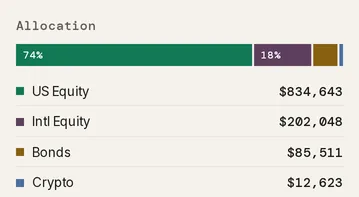
- In the Summary panel, coins fill the Crypto class in Allocation.
- In net worth, crypto has its own Crypto band.
- In a coin’s drawer, the Lots table lists each acquisition. See Edit a holding.
Troubleshooting
Section titled “Troubleshooting”A coin’s value reads “—”.
Section titled “A coin’s value reads “—”.”The coin has no price. A Kraken Ledger export states none, and neither does a Balance export with no USD column. Import a Kraken Balance export with a price or USD column. For a manual holding, click Remove holding in its drawer and add it again with a Price / share.
A total reads “excludes 1 position with no reported value”.
Section titled “A total reads “excludes 1 position with no reported value”.”A coin in that group has no price, so the total leaves it out. The fix is the same as above.
The cost basis reads “0.5 BTC with unknown cost”.
Section titled “The cost basis reads “0.5 BTC with unknown cost”.”The file records part of the coin without a cost, such as a transfer in from another wallet or a reward the export puts no value on. Those units count in the coin’s quantity and value, and the line ends not in the basis or its gain.
Does Taiga Finance connect to my Coinbase account?
Section titled “Does Taiga Finance connect to my Coinbase account?”No. Coinbase, Kraken and Gemini come in as files through Upload file. A newer export updates the same account.
Can Taiga Finance follow a wallet address?
Section titled “Can Taiga Finance follow a wallet address?”No. A cold wallet is a manual account with the Crypto subtype, holding the amounts you type.
Can crypto be in a portfolio?
Section titled “Can crypto be in a portfolio?”Yes. A portfolio with the Crypto kind starts with a target of 100% crypto. See Portfolios and Target mix.
Can I export my crypto holdings?
Section titled “Can I export my crypto holdings?”Yes, with the rest of your holdings. ⋯ → Export holdings on Investments includes every coin, as Can I export my holdings? describes.