Accounts & connections
Troubleshooting sync
Read an account's sync status and fix the state it is in.
When an account stops updating, Taiga Finance says why on the account itself: a colored dot on Accounts, a banner in the account’s drawer, and a status pill for each connected bank in Settings. Read that first. A broken bank link is repaired with Fix connection. An account you switched off is turned back on with its own toggle. A bank that merely failed its last sync catches up on its own.
What is a sync status?
Section titled “What is a sync status?”A status is what Taiga Finance knows about one account’s feed: whether syncing is on, whether the bank link behind it is healthy, and when the bank last reported a balance. A credit card can stop showing new charges because the bank wants a fresh sign-in. A checking account can show a red dot because the bank stopped sharing it, while the bank itself reads Healthy. Both look wrong on Accounts, and the status is what separates them.
Where do I see an account’s sync status?
Section titled “Where do I see an account’s sync status?”Three places name it, and each uses its own words for the same states.
On Accounts, each account carries a small colored dot, in the list and in its drawer header. Hover it for the exact state and the day the bank last reported, Received and the date. A green dot means the account’s connection is updating. A red dot means it is not, and the hover says why. A hollow ring means sync is off. A dashed ring is a manual account.
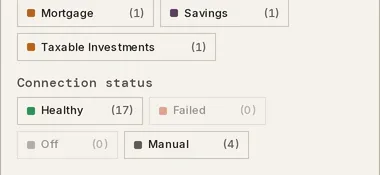
On the same page, Filters holds a Connection status facet that groups your accounts by four states, Healthy, Failed, Off, and Manual, with a count beside each.
In Settings, under Connections, every bank you have connected carries its own pill: Healthy, Expiring, Needs attention, Failed, Disabled, Disconnected, Access revoked, or Live sync stopped. Several accounts usually stop at once because they share one link. Read the bank’s pill then. Connection statuses lists what each pill means and the first step for it.
What does “Needs attention” mean?
Section titled “What does “Needs attention” mean?”The bank has asked for a fresh sign-in, and Taiga Finance cannot read the account until it gets one. It shows as Needs attention on the bank’s row in Settings, with the cause after it when the bank named one, such as consent expired at the bank. On Accounts, every account behind that link turns a red dot, and its drawer shows the banner Plaid connection is broken with the line Transactions and balances are not updating.
Waiting changes nothing. The link is waiting on you. Reconnect it, as below. The balances and transactions already pulled in stay where they are the whole time.
What does an “Expiring” bank mean?
Section titled “What does an “Expiring” bank mean?”The bank has told Plaid it will end this connection’s access on a date, and nothing has broken yet. The bank’s row in Settings reads Expiring with access expires and the date, and each account’s drawer shows an amber banner, Plaid access expires …, with Transactions and balances stop updating after that. The same Fix connection button renews the access before the date. The steps are the ones below.
What does a “Failed” bank mean?
Section titled “What does a “Failed” bank mean?”The last sync attempt for that bank ended in an error. Failed and Needs attention both redden the dot on Accounts and show the same Plaid connection is broken banner. They clear differently. A Failed bank goes back to Healthy at the next successful sync, and Needs attention does not clear until you sign in again. A bank that still reads Failed after another sync has run has a link to repair.
How do I reconnect a bank?
Section titled “How do I reconnect a bank?”-
On Accounts, open an account fed by the broken link. A red banner sits under the balance, reading Plaid connection is broken, followed by the cause when the bank named one.
-
Click Fix connection. Plaid Link opens in its own window over Taiga Finance.
-
Sign in with the bank’s own login and confirm, inside Plaid’s window. The window closes and Taiga Finance confirms with Connection repaired.
-
The dot greens and the banner disappears. If the repair does not complete, Taiga Finance says Repair did not complete — try again. and the banner stays.
The same Fix connection button sits on the bank’s row in Settings, beside its status pill. Either one repairs the link. The bank consent you agreed to when connecting is not asked again for a repair.
What does “Sync off” mean?
Section titled “What does “Sync off” mean?”Syncing is switched off for that account. The dot turns into a hollow grey ring, its hover reads Sync off with the day the bank last reported, and the Connection status filter calls it Off. Nothing is broken. The last-known balance is still shown and still counts. No new data is pulled. A whole bank can be switched off the same way, and its pill in Settings then reads Disabled.
-
On Accounts, open the account and scroll to the Manage band.
-
Click Advanced status. The disclosure opens on the account’s lifecycle toggles.
-
Turn Sync new data from this account’s provider on.
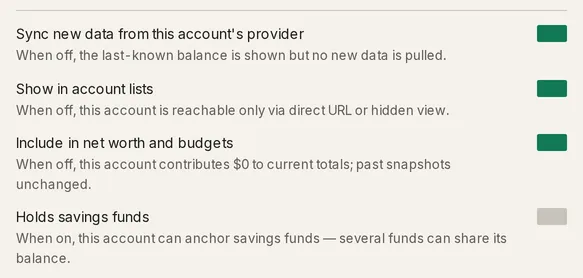
For a whole bank, open Settings, expand the bank’s row, and click Enable. Each account under it also carries its own switch, reading Syncing or Off.
Why is one account red when its bank reads Healthy?
Section titled “Why is one account red when its bank reads Healthy?”The link is fine, and the account itself fell out of it. The drawer’s banner says which way:
- This account is no longer shared through Plaid. The account was dropped from the connection, at the bank or in Plaid’s account picker. Its balance and transactions stopped updating. Add or change accounts on the banner, or on the bank’s row in Settings, reopens the picker so you can share it again.
- Not in the last Plaid fetch. The bank answered the last sync without this account. Its balance and transactions stopped updating. A later sync that includes it again clears the banner on its own.
An account your partner connected can also read red for you while the fix is theirs. See The dot is red and there is no Fix connection button.
A manual account’s staleness is a different thing. It arrives as a banner reading balance is 30 days out of date, on the cadence set under Reminder cadence in the account’s Advanced status, and a balance you record yourself is what clears it. See Manual accounts.
When is waiting the fix?
Section titled “When is waiting the fix?”Three states resolve on their own, and a sync during any of them pulls nothing new.
A bank you just connected is still on its first sync. The sync panel notes First sync may take ~30 min. See Connect a bank.
Inside a bank’s daily refresh window, the sync panel reads You synced recently, so a sync may not pull anything new yet, and Sync now steps back to a secondary button.
A bank reading Failed clears at the next successful sync.
Troubleshooting
Section titled “Troubleshooting”“Live sync stopped for 1 account”
Section titled ““Live sync stopped for 1 account””The household member who owned that bank connection has left. The account keeps every balance and transaction it already had, but nothing new flows. There is no link left to repair, so the row in Settings offers no Fix connection and no per-account switch. Connect the bank again under your own login to resume it.
The dot is red and there is no Fix connection button
Section titled “The dot is red and there is no Fix connection button”The broken link belongs to the other person in your household. Repairing it is a change to their bank connection, so it has to happen from their account. Their accounts still read red for you until they do. A connection they paused or ended reads Fed by their name’s connection · paused or · ended in the drawer instead.
“Could not start the repair — try again shortly.”
Section titled ““Could not start the repair — try again shortly.””Taiga Finance could not open a repair session with Plaid, usually a passing error. Click Fix connection again in a moment.
The bank connected but no accounts appeared
Section titled “The bank connected but no accounts appeared”Its card above the ledger reads No accounts found, which means the first sync finished and returned nothing, and Manage on the card opens Settings. The bank’s row there reads No accounts linked yet — they appear after the next sync. Plaid only sends the accounts you chose in its window, so Add or change accounts on the row reopens the picker.
“Sync failed” on the pill in the page header
Section titled ““Sync failed” on the pill in the page header”The most recent run as a whole ended in an error. The sync panel, opened from the pill, reads This sync didn’t finish. Your completed steps are saved. with Retry sync. A run can fail for a reason that has nothing to do with one bank link, so a bank’s own pill in Settings is the one to read for that bank.
Can I sync one account on its own?
Section titled “Can I sync one account on its own?”No. The trigger runs a sync for your whole household. Open the panel from the Synced pill in the page header, then click Sync now. Your data also refreshes on its own in the background.
Does reconnecting lose my transactions?
Section titled “Does reconnecting lose my transactions?”No. A repair signs the existing link back in, and everything already pulled in stays. Plaid then fills the gap the broken link left, and a transaction Taiga Finance has already seen is not written twice, because each one is matched on the bank’s own transaction id.
Does an account with sync off still count in net worth?
Section titled “Does an account with sync off still count in net worth?”Yes. Switching sync off stops new data arriving. The last-known balance stays on the account and keeps counting toward net worth and budgets. Leaving it out of those totals is the separate Include in net worth and budgets switch in the same group.
Can I catch up without waiting for a sync?
Section titled “Can I catch up without waiting for a sync?”Yes. The Import page’s Transactions tab reads a CSV or PDF statement from the bank into the same account, and a row the connection already brought in is skipped as a duplicate. The same file is safe to import while the connection is broken. See CSV & PDF importers.
Does Taiga Finance warn me before a connection breaks?
Section titled “Does Taiga Finance warn me before a connection breaks?”Yes, when the bank tells Plaid in advance. The bank’s row reads Expiring and each account’s drawer carries Plaid access expires with the date. With the Connection issues notification on, a push titled Access expires and the date names the bank. Fix connection before that date keeps the data flowing.