Using Taiga Finance
Add a debt
Add a card, loan or other balance you owe to Debt, and change or remove it later.
Adding a debt puts a balance you owe on Debt, where Taiga Finance projects it forward with its rate and payments until it is paid off. Click + Add debt and fill in the Track a debt drawer. A name, a type and a balance are enough. The balance comes live from a connected account or from a manual account you keep. The rate, the minimum and your planned payment can come later, from the row or the debt’s drawer.
What is a tracked debt?
Section titled “What is a tracked debt?”A tracked debt is a balance Taiga Finance follows on Debt: a card, a car loan, a HELOC, a loan from family, a medical bill. Each one sits on an account. A connected card or loan keeps its balance current from the bank. A family loan has no bank feed, so Taiga Finance makes a manual account for it and you record the balance. Once the debt has a rate, the payoff plan can say when it clears and what it costs in interest.
How do I add a debt?
Section titled “How do I add a debt?”-
On Debt, click + Add debt. The Track a debt drawer opens. An empty Debt page offers Add a debt instead.
-
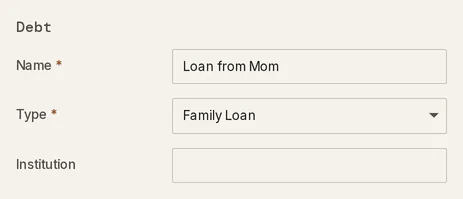
Under Debt, type a Name and pick a Type. Institution is optional. A HELOC adds a Secured property field, which starts at Unlinked. Pick a home there to tie the line to it, as in Home equity & HELOC.
-
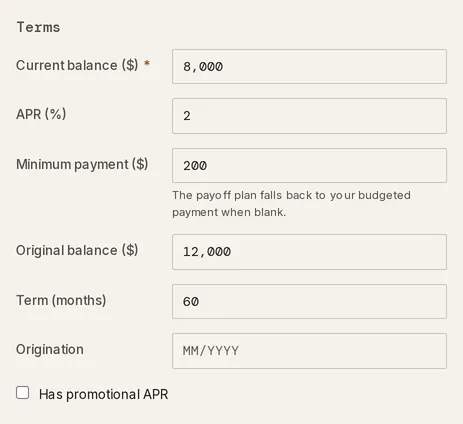
Under Terms, enter the Current balance ($). Add the APR (%) and Minimum payment ($) if you know them. Any type other than Credit Card, HELOC or Buy-Now-Pay-Later adds Original balance ($), Term (months) and Origination. Tick Has promotional APR to record a Promo APR (%) and the month it ends in Promo ends.
-
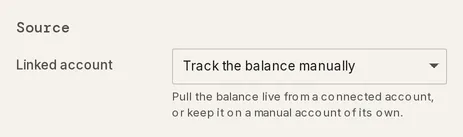
Under Source, leave Linked account on Track the balance manually, or pick one of your card or loan accounts from the list. A linked account replaces the balance field with the account’s balance, marked pulled live, and fills Institution from the account. If the account carries a rate, it fills APR (%) too, and you can still change it.
-
Click Add debt. The drawer closes and the debt joins the In payoff plan band. While the form is incomplete, Add debt stays greyed out with the reason beside it, such as A name is required.
How do I track an account that shows “Not tracked”?
Section titled “How do I track an account that shows “Not tracked”?”A credit card or loan account with no debt yet appears in the Not in payoff plan band with a Not tracked mark and a read-only balance. Click Not tracked, then Start tracking. Taiga Finance makes it a debt on that account, keeps its balance and any rate the account carries, and shows Now tracking with the account’s name. The new debt stays in Not in payoff plan until you turn on In payoff plan in its drawer.
Open account in the same menu, or a click anywhere else on the row, opens the account. If it isn’t a debt at all, change its type there.
How do I set the rate and the planned payment?
Section titled “How do I set the rate and the planned payment?”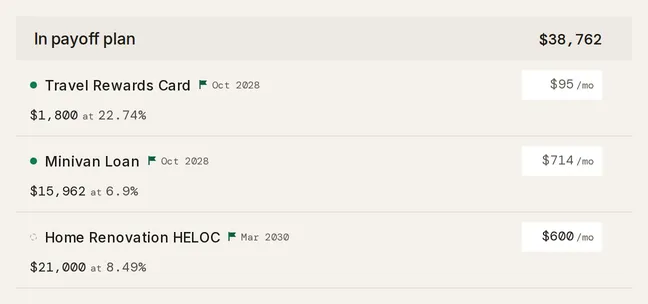
-
Click the rate on the row to edit it. A debt with no rate reads Add APR, and the payoff plan projects no payoff month for it until it has one. See what happens to a debt without a rate.
-
If your bank reported a rate for a debt that has none, the row offers it as Confirm with the rate, such as Confirm 21.99%. Click it to set that rate.
-
Click the /mo figure and type the monthly amount you plan to pay. Hover the figure to read what the plan pays, such as Planned $600 · minimum $250. Clear it to go back to the minimum, which a blank /mo shows in a muted face.
A debt outside the payoff plan has no /mo figure.
How do I change a debt later?
Section titled “How do I change a debt later?”Click a debt’s row to open its drawer. The name at the top is editable.
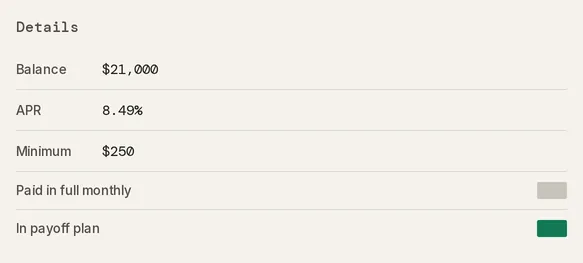
- Balance is editable on a debt you track manually. Typing a new figure records a balance reading dated today. A linked debt shows its balance read-only with a synced mark, because the balance follows the account.
- APR and Minimum take the numbers the payoff plan runs on. Clearing APR sets the rate back to unknown, not to 0%.
- Paid in full monthly, on a Credit Card, HELOC or Buy-Now-Pay-Later debt, marks one you clear every statement. It leaves the payoff plan and the row shows Paid monthly.
- In payoff plan moves the debt between the two bands. Turning it on for a card marked Paid in full monthly turns that mark off.
A loan’s Original balance, Term and Origination live on its account. On Accounts, open the account and edit them in its Loan terms section.
How do I point a debt at its Plan line?
Section titled “How do I point a debt at its Plan line?”The Linked section of the drawer names the account the debt sits on, and the Plan line picker names the Plan line its payment is budgeted in.
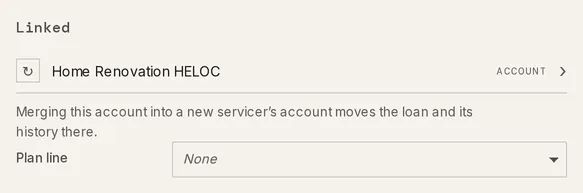
Pick a line from Plan line, or None to clear it. Open on Plan → opens the line you picked. The row on Debt also shows a PLAN chip with the line’s name, which links there too. Linking a line changes no figure. The payoff plan, the planned payment and your plan’s budgets read the same with or without it.
A debt can’t be moved to a different account from the drawer. When a loan moves to a new servicer, merge the old account into the new one on Accounts. The debt and its balance history move with it.
How do I delete a debt?
Section titled “How do I delete a debt?”-
Open the debt’s drawer and click Delete debt at the bottom.
-
Click Delete to confirm. The debt leaves the ledger and the payoff plan.
Only the member who owns the debt sees Delete debt.
Troubleshooting
Section titled “Troubleshooting”Add debt is greyed out.
Section titled “Add debt is greyed out.”The form is missing something, and the reason shows beside the button. A name is required. means the Name field is empty. APR must be 0% or more. means a negative rate was typed. A promo end month is required. means Has promotional APR is ticked with no Promo ends month. Fix the field and the button turns on.
Adding a debt reads “that account is already linked to another debt or mortgage”.
Section titled “Adding a debt reads “that account is already linked to another debt or mortgage”.”An account backs one debt or one mortgage at a time. The Linked account list offers only accounts no debt or mortgage holds, so another debt or a mortgage took this one after the drawer opened. Click Cancel, open + Add debt again, and pick from the refreshed list. If the other debt already tracks that account, edit that one instead.
The planned payment I typed shows the minimum in its tooltip.
Section titled “The planned payment I typed shows the minimum in its tooltip.”The amount is below the debt’s minimum, so the payoff plan pays the minimum instead. The tooltip reads Planned $50 is below the $95 minimum — the payoff plan pays $95. A /mo amount at or above the minimum is used as typed. If the lender’s minimum has changed, update Minimum in the drawer.
A “Not tracked” row won’t let me edit its balance or rate.
Section titled “A “Not tracked” row won’t let me edit its balance or rate.”A Not tracked row is an account, not yet a debt, so it has nothing to edit. Click Not tracked, then Start tracking. If the mark opens no menu, the account belongs to the other member of your household and its tooltip reads Auto-detected from this account’s type — open the account to change its type. Only they can start tracking it.
I picked the wrong type.
Section titled “I picked the wrong type.”The drawer has no Type field, because the type is set when the debt is added. Delete the debt and add it again with the right type.
What happens to the account when I delete a debt?
Section titled “What happens to the account when I delete a debt?”A connected account stays. Its balance and transactions remain on Accounts, and you can track it again. A manual account Taiga Finance made for the debt is deleted with it, balance history included, unless it holds transactions. Deleting the account on Accounts deletes its debt too.
Does Taiga Finance fill in a rate for me?
Section titled “Does Taiga Finance fill in a rate for me?”Only when you accept it. Linking an account that carries a rate fills the APR (%) field, which you can change before saving. A rate your bank reports for a debt with none shows as Confirm on the row, and nothing is set until you click it. An introductory rate the bank reports shows in the drawer’s Promo row and is set once you enter its end month.
What happens when my bank balance changes?
Section titled “What happens when my bank balance changes?”A linked debt follows it. A payment or a new charge moves the debt’s balance on the next sync. Your rate, minimum and planned payment stay as you set them. A manual debt changes only when you record a new balance, in the drawer or on its account on Accounts. See Manual accounts.
Do I add my mortgage here or on Real estate?
Section titled “Do I add my mortgage here or on Real estate?”On Real estate. A mortgage isn’t one of the types in Track a debt. Add it with its property on Real estate, and it shows on Debt with a Mortgage mark. See Mortgage.
Does my partner see a debt I add?
Section titled “Does my partner see a debt I add?”As its account’s Sharing allows. A debt follows the Sharing setting of the account it sits on, set on Accounts. A debt hidden from your partner shows in their view only as a count, such as 1 private debt · hidden from this view, with no name or balance. See Couples & household visibility.