Your account & settings
Deleting your data
The Danger zone controls that empty or end an account, how a delete runs when you share a household, and what Taiga Finance still holds afterwards.
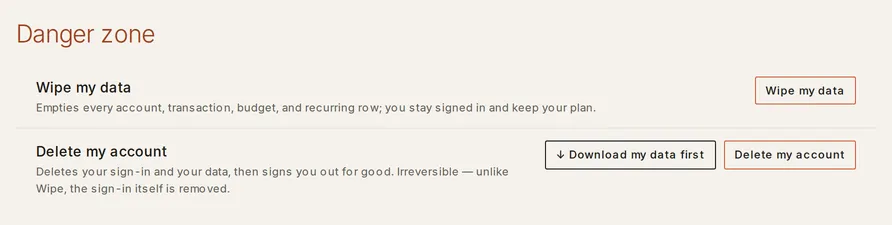
Removing one transaction or one account is an edit on the page that shows it. The controls here do something larger: they empty or end the whole account at once, and they sit together in Settings › Danger zone. Wipe my data clears every row and leaves you signed in. Delete my account clears your rows, deletes your sign-in, and signs you out for good. A delete inside a household you share with another account holder is a choice between two doors, and the dialog shows what each one keeps before you confirm. Neither control can be reversed, and neither is the same as a full erasure.
What is account-level deletion?
Section titled “What is account-level deletion?”Account-level deletion is one action that reaches every account, transaction, budget, holding, and recurring row you own, in every part of the app at once. It exists for the moments when the account itself is the thing being changed: starting over from scratch, or leaving a household you used to share. Both controls ask you to type a confirmation sentence before they run, and both ask you to confirm it’s you if you signed in a while ago.
Which control removes what?
Section titled “Which control removes what?”| Control | Where | Clears | Leaves |
|---|---|---|---|
| Wipe my data | Settings › Danger zone | Every account, transaction, budget, holding, and recurring row across the household | Your sign-in, your email, your plan, and the account itself |
| Delete my account | Settings › Danger zone | Your rows, your stored credentials, your sign-in, your sessions | A de-identified id and a short list of records that age out |
| Delete my account, in a shared household | The same button, when another account holder shares the account | Your own rows, or the whole account, by the door you pick | What the preview lists under Stays with the other member |
| Disconnect a bank | Settings › Connections | Taiga Finance’s access at Plaid, and the accounts only if you choose to delete them | The accounts and their history, kept and frozen, unless you pick the delete option |
| Disconnect Google Sheets | Settings › Your data | The stored authorization | The spreadsheet in your Drive, and every row in Taiga Finance |
Wipe my data
Section titled “Wipe my data”Wipe my data empties the account without ending it. The confirmation reads Wipe all your data?, states It cannot be undone, and asks you to type WIPE MY DATA. The toast afterwards reads Your data has been wiped.
Afterwards you are still signed in, on the same email, with the same plan, and the account is back to the state a new one starts in. Bank connections do not survive it: Taiga Finance drops the credentials it stored and ends its access to your Plaid connections at Plaid.
A wipe covers the whole household, so it is refused while another member holds their own sign-in.
Delete my account
Section titled “Delete my account”Delete my account removes the data and the sign-in. It asks for two things: a typed DELETE MY ACCOUNT, and a preview that loads before the confirm button turns on. On an account nobody else shares, the dialog says Your sign-in is deleted and you’re signed out for good — to come back you’d sign up again. A download made beforehand is the only copy you keep.
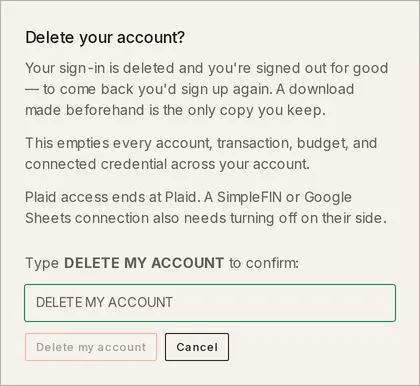
In one step it sweeps every row you own, drops the bank and Google credentials Taiga Finance stored, removes your email and name, ends your sessions, and takes your support reports and their screenshots with it. Taiga Finance ends its access to your Plaid connections at Plaid and drops your usage-analytics events. If the household’s subscription ends with the account, the preview says so: Your subscription is canceled at Stripe — nothing more is charged. You land back on the sign-in page with the delete already complete.
↓ Download my data first sits beside Delete my account in the Danger zone. The export stops being available once the account is gone.
A Google Sheets connection outlives the delete on Google’s side. Taiga Finance drops the token it stored; removing Taiga Finance from your Google account’s permissions is a step in your Google account.
Deleting inside a shared household
Section titled “Deleting inside a shared household”When another person holds their own sign-in on the account, the delete depends on your role.
As the household’s admin, the dialog opens with How to delete and two doors:
- Transfer admin to [name], then delete my sign-in. They become the admin. The account, the data shared with the household (joint accounts included) and any subscription stay with them. The data you did not share, including accounts shown only as a balance, is deleted with your sign-in.
- Delete everything. Both sign-ins and every account, transaction and budget are deleted, and any subscription is canceled. The other person can no longer sign in. This door’s typed sentence is DELETE EVERYTHING.
The confirm button stays locked until you pick a door, with the reason No option is chosen yet.
As a member who is not the admin, the delete removes only your side. The preview splits into Stays with [name] and Deleted with you, item by item. Shared accounts stay with the admin, and the line Categories and budget history stay too closes that list. Your personal budget lines and income, savings funds, points programs, bank connections, and sign-in go with you, along with your private transactions.
A transferred account keeps its history and loses its feed. The preview marks each one live sync stops until [name] reconnects it.
Disconnecting a bank or Google Sheets
Section titled “Disconnecting a bank or Google Sheets”Neither control deletes a row unless you ask it to.
- Disconnect on a bank opens a dialog headed The accounts it brought in, with two options: Keep the accounts and history in Taiga Finance, which leaves them frozen, or Delete the accounts and their history, which asks you to type DELETE ACCOUNTS and removes the balances, transactions and holdings they brought in. Either way Taiga Finance asks Plaid to end its access. Managing accounts covers the connection controls.
- Disconnect on Google Sheets stops pushing data to the sheet. The dialog says it outright: The sheet stays in your Drive, unmodified. Connecting again creates a new one.
What does a delete leave behind?
Section titled “What does a delete leave behind?”A delete removes your data and your identity. It is not an erasure of every trace. What remains carries no name, no email, and no financial detail:
| What remains | Why |
|---|---|
| A de-identified account id | The record of which terms and notices you accepted must outlive the person, and other people’s rows may still point at it |
| Rows belonging to a household member who stayed, that reference you, such as comments you wrote | They are that person’s data, not yours |
| Shared merchant and category caches | Shared across accounts and keyed by a one-way hash, so nothing in them names you |
| Usage-analytics events, pseudonymous and carrying no amounts | Dropped at delete; a write landing mid-sweep can survive until the retention window ends |
| The bank provider’s webhook ledger | Keyed by the provider’s own item id, with no user column; retention-bounded |
| Server logs and database backups | Outside the erasure scan; backups expire within 14 days, and logs age out on their own schedule rather than on request |
| The support thread, if you wrote in | The record of the request itself |
How do I request a full erasure?
Section titled “How do I request a full erasure?”-
Delete the account yourself, from Settings › Danger zone. That step proves the request came from you.
-
Write to support from the email address that was on the account. A request from any other address cannot be acted on.
-
Taiga Finance finishes the erasure and replies with a list of what, if anything, remains and for how long. It completes within 30 days of the request.
If you shared a household with someone who kept their account, the de-identified id stays attached to the history that moved to them.
Troubleshooting
Section titled “Troubleshooting”“The account preview is still loading.”
Section titled ““The account preview is still loading.””The confirm button is locked until the delete preview has loaded. Close the dialog and open it again. The button unlocks once the preview appears.
“You share a household with someone who has their own login.”
Section titled ““You share a household with someone who has their own login.””A wipe empties the whole household, so it is refused while another member holds their own sign-in. The message continues: Remove them or transfer admin to them first, or ask the maintainer. Delete my account is the control for leaving on your own: it offers the two doors above, or removes only your side.
“Your household changed while this was open.”
Section titled ““Your household changed while this was open.””Someone joined or left the household between the preview loading and your confirmation. Taiga Finance refuses the stale summary and shows the fresh one instead. Read it and confirm again.
“Your account can’t be deleted while an email change is in progress or its undo link is still active.”
Section titled ““Your account can’t be deleted while an email change is in progress or its undo link is still active.””A pending email change holds the delete, because the lock link sent to your old address could still reverse that change. Finish or cancel the change in Settings › Account › Email, then delete.
“Your account can’t be deleted right now.”
Section titled ““Your account can’t be deleted right now.””The account is under a hold that only the operator can lift. The message ends Please contact support if you need help; write from the account’s email address.
Can I undo a wipe or a delete?
Section titled “Can I undo a wipe or a delete?”No. Both run as a single step and complete before the page reloads. A delete removes the sign-in, so coming back means signing up again for a new, empty account. Nothing from the old one returns.
Does deleting my account delete my partner’s data?
Section titled “Does deleting my account delete my partner’s data?”It depends on the door. As a member, only your own rows go; the shared accounts stay with the admin and stop syncing until they reconnect them. As the admin, Transfer admin leaves them the account and the subscription, and Delete everything removes their sign-in and data too. The preview names each item before you confirm.
Does disconnecting a bank delete its transactions?
Section titled “Does disconnecting a bank delete its transactions?”Only if you choose it. The first option in the disconnect dialog keeps the accounts and history in Taiga Finance, frozen. The second deletes them, after a typed DELETE ACCOUNTS.
Does a wipe end my bank connections?
Section titled “Does a wipe end my bank connections?”Yes, on Taiga Finance’s side. A wipe drops the credentials Taiga Finance stored and ends its access to your Plaid connections at Plaid. A Google Sheets connection still needs removing in your Google account.
Can I take a copy out first?
Section titled “Can I take a copy out first?”Yes. Settings › Your data › Export my data downloads everything as one ZIP of CSVs, and ↓ Download my data first sits beside the delete button for the same file. Neither is available once the account is gone.